Real tools, real workflows, real results — from a solo Etsy seller to a two-person marketing agency
You’ve read the explainers. You know AI can “boost productivity” and “transform your business.” Great — but what does that actually look like on a random Tuesday?
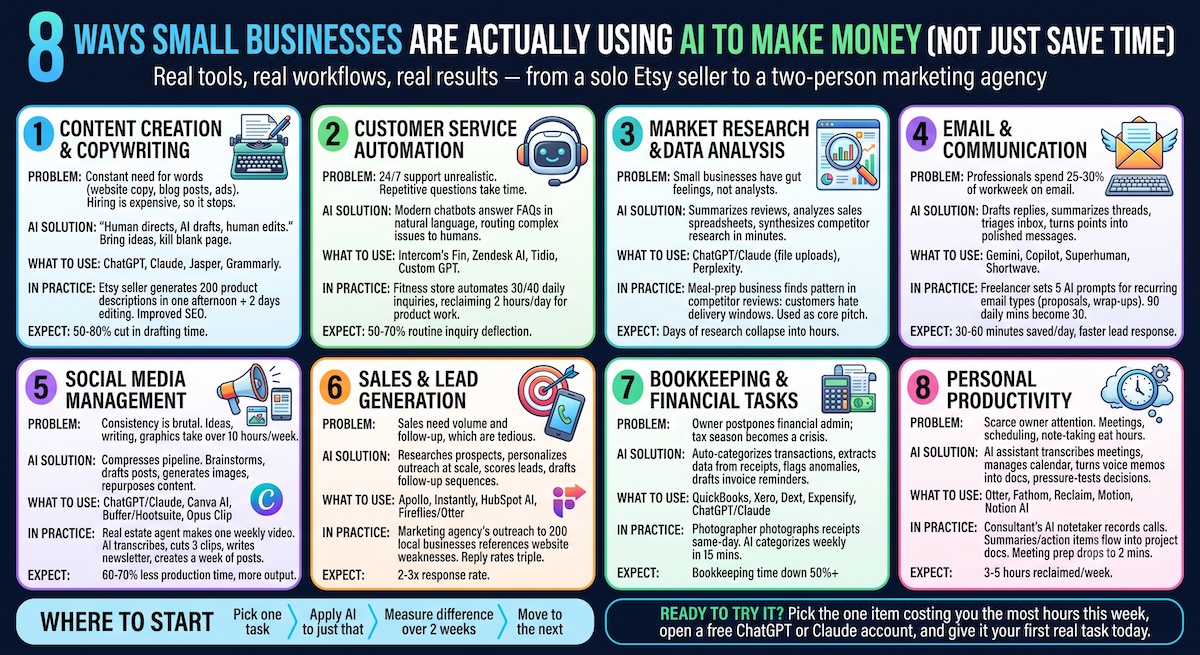
Here’s the truth: AI doesn’t make money by itself. It makes money by making you faster. The freelancer who cuts delivery time in half can take on twice the clients. The shop owner who automates order-status questions gets those hours back to go find new customers.
Below are eight areas where small businesses are using AI right now — with tools you can open in the next five minutes. For each: the problem, how AI solves it, what to use, and what results look like in practice.
1. Content Creation and Copywriting
Every business needs a constant stream of words — website copy, product descriptions, blog posts, ad copy, video scripts. Hiring writers costs $50–$500+ per blog post, so most owners just… stop publishing.
AI writing tools flip the math. The winning workflow isn’t “AI writes, human publishes” — it’s “human directs, AI drafts, human edits.” You bring the ideas, voice, and facts; AI kills the blank page.
What to use:
- ChatGPT or Claude for general writing
- Jasper for marketing-specific templates
- Grammarly for polishing the final draft
The skill that actually matters is prompting with context. Skip “write a blog post about coffee.” Try: “Write a 600-word post for my Portland coffee roastery, aimed at home brewers, friendly expert tone, covering three common grind-size mistakes.”
In practice: An Etsy seller with 200 product listings needs unique descriptions for each — normally weeks of work. She feeds in product details and a voice sample, generates all 200 drafts in an afternoon, then spends two days editing. Better copy also means better search visibility.
Expect: A 50–80% cut in drafting time. Quality still depends on your edit pass — unedited AI copy reads generic and can dent your brand.
2. Customer Service Automation
Customers want fast answers around the clock. Hiring 24/7 support isn’t realistic for a small team — and most questions are the same five questions anyway: Where’s my order? What’s your return policy? Do you ship to Canada?
Modern AI chatbots read your website, help docs, and policies, then answer in natural language — not the “press 1 for returns” bots of a decade ago. They handle the repetitive 70–80% and route the rest to a human.
What to use:
- Intercom’s Fin or Zendesk AI for full-featured support
- Tidio for simpler website chat
- A custom GPT trained on your FAQ, if you want something lighter
In practice: An e-commerce fitness store gets 40 support emails a day, mostly order-status and sizing questions. A chatbot connected to the store’s order system now resolves about 30 of those automatically — reclaiming roughly two hours a day for product work.
Expect: 50–70% of routine inquiries deflected, response time down from hours to seconds. Just don’t remove the easy path to a human — a badly configured bot frustrates people fast.
3. Market Research and Data Analysis
Big companies have analysts. Small businesses have gut feelings. AI narrows that gap by reading and summarizing hundreds of reviews, analyzing your sales spreadsheet in plain English, and synthesizing competitor research in minutes.
What to use:
- ChatGPT or Claude for file uploads — drop in a sales CSV, ask questions
- Perplexity for sourced market research
- Manually pasted competitor reviews, with a prompt to extract recurring complaints (those complaints are your product opportunities)
In practice: Someone scoping a meal-prep business feeds AI the reviews of three local competitors and finds a clear pattern: customers love the food but hate the inflexible delivery windows. That insight, found in one evening instead of weeks, becomes the new business’s core pitch.
Expect: Days of research collapse into hours. But AI can misstate numbers, so verify anything specific before you build a business plan on it. Treat it like a fast junior analyst whose work you always double-check.
4. Email and Communication Tools
Professionals reportedly spend 25–30% of the workweek on email. AI can draft replies in your tone, summarize long threads, triage your inbox by importance, and turn bullet points into a polished client message in seconds.
What to use:
- Gemini in Gmail or Copilot in Outlook, right where you already work
- Superhuman or Shortwave for AI-first email
- A simple trick that works today: paste a thread into ChatGPT or Claude and say, “Draft a polite reply that declines the meeting but offers two alternatives.”
In practice: A freelance designer builds one AI prompt each for her five recurring email types — proposals, follow-ups, revisions, invoice reminders, wrap-ups. Ninety minutes of daily email becomes 30, and her follow-ups finally go out on time.
Expect: 30–60 minutes saved a day, plus faster responses to leads — which measurably affects close rates in service businesses.
5. Social Media Management
Social media rewards consistency, and consistency is brutal. Ideas, writing, graphics, scheduling across platforms — easily 10+ hours a week, which is why most small businesses post in bursts, then go quiet.
AI compresses the whole pipeline: brainstorm a month of ideas in minutes, draft platform-specific posts, generate images, and repurpose one piece of content into many.
What to use:
- ChatGPT or Claude for ideation and captions
- Canva’s AI features for graphics
- Buffer or Hootsuite for AI-assisted scheduling
- Opus Clip to slice long video into short clips
In practice: A real estate agent records one 10-minute weekly video. AI transcribes it, cuts three short clips, drafts a newsletter, and generates a week of posts. One hour of recording becomes a full week of multi-platform presence.
Expect: 60–70% less production time with more output — but zero-human-touch feeds still perform poorly. AI handles production; you still bring the personality.
6. Sales and Lead Generation
Sales lives on volume and follow-up, and both are tedious. AI researches prospects and personalizes outreach at scale, scores leads so you call the hottest ones first, and drafts follow-up sequences so nothing slips through.
What to use:
- Apollo or Instantly for AI-assisted outbound email
- HubSpot’s AI features for lead scoring and CRM upkeep
- Fireflies or Otter for call transcription and summaries
In practice: A two-person marketing agency wants 20 new clients. Instead of a generic blast, AI researches 200 local businesses and drafts outreach referencing each one’s specific website weaknesses. Reply rates triple versus their old templates.
Expect: 2–3x the response rate of generic outreach. Watch yourself here — AI makes spam easy, and spam wrecks your domain reputation. The goal is better outreach, not just more of it.
7. Bookkeeping and Financial Tasks
Financial admin is the job every owner postpones — categorizing expenses, chasing invoices, reconciling accounts. Then tax season becomes a crisis.
AI now auto-categorizes transactions, extracts data from photographed receipts, flags anomalies like a double-charged subscription, drafts invoice reminders, and answers questions like “What did I spend on software last quarter?”
What to use:
- QuickBooks or Xero for built-in AI categorization and reconciliation
- Dext or Expensify for receipt capture
- ChatGPT or Claude for spreadsheet trend analysis
In practice: A freelance photographer used to lose a full weekend every quarter to expenses. Now receipts get photographed same-day, AI categorizes transactions weekly in about 15 minutes, and automated reminders chase late-paying clients.
Expect: Bookkeeping time down 50% or more. Important caveat: AI isn’t an accountant — keep a human for tax strategy and anything with legal weight.
8. Personal Productivity
The scarcest resource in any small business is the owner’s attention. Meetings, scheduling, note-taking, planning — they quietly eat hours that should go toward revenue-producing work.
AI acts like a tireless assistant: transcribing meetings with action items, managing your calendar, turning voice memos into organized docs, and acting as a thinking partner to pressure-test decisions.
What to use:
- Otter or Fathom for meeting notes
- Reclaim or Motion for AI calendar management
- Notion AI for organizing documents
- A running ChatGPT or Claude conversation, open all day, for every small drafting or research task
In practice: A consultant juggling six clients records every call with an AI notetaker. Summaries and action items land in her project docs automatically, and meeting prep drops from 30 minutes of “what did we discuss last time?” to a 2-minute review.
Expect: 3–5 hours reclaimed per week. Redirected into sales, product, or clients, that’s where AI quietly turns into revenue.
Where to Start
Don’t try to adopt all eight at once. The businesses seeing real results follow the same pattern: pick the single task eating the most time or causing the most pain, apply AI to just that, and measure the difference over two weeks. Then move to the next.
Notice the thread running through every example above — AI produces the draft, the analysis, or the automation, but a human stays in the loop for judgment, accuracy, and voice. That combination is where the money actually is.
Ready to try it? Pick the one item on this list that’s costing you the most hours this week, open a free ChatGPT or Claude account, and give it your first real task today. Two weeks from now, you’ll have a number — hours saved, replies sent faster, listings published — that tells you exactly where to go next.
Hello, this is a comment I want to test.